
Windows software for laptop repair technicians

LapDoctor Laptop diagnostic software for repair shops

One scan reads the machine's hardware, from CPU and memory to storage, battery and display, and grades it from A+ to F. It also gives you tests to run in front of the customer, and tools for before and after a format.

Download LapDoctor free for Windows

Windows 10 and 11 (64-bit) · 17.9 MB · Version 1.0.0 · Free plan never expires

LapDoctor runs on Windows PCs. On your phone? Open this page on your computer.

The installer isn't digitally signed yet, so Windows shows a warning the first time you run it. Installation steps and file checksum

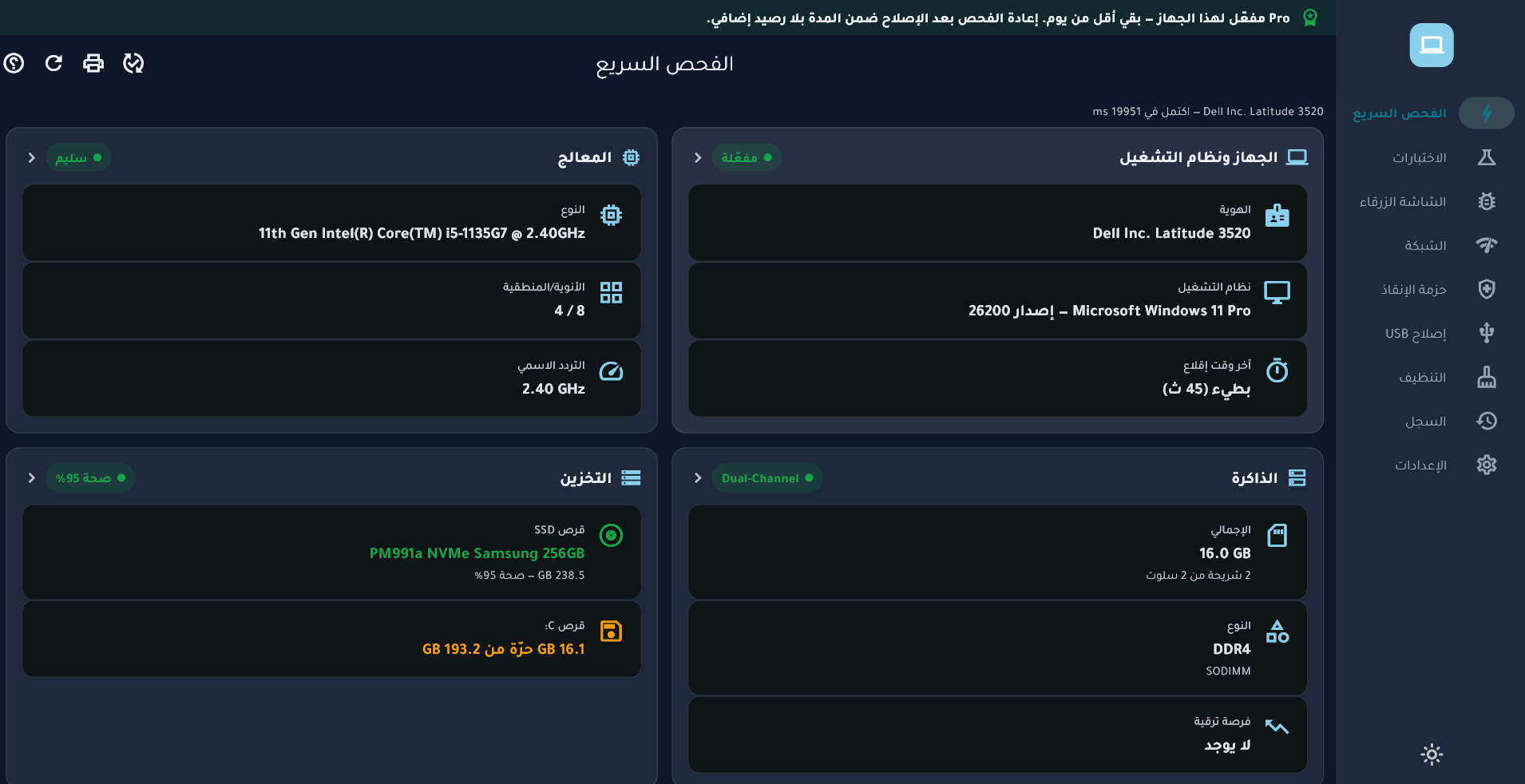
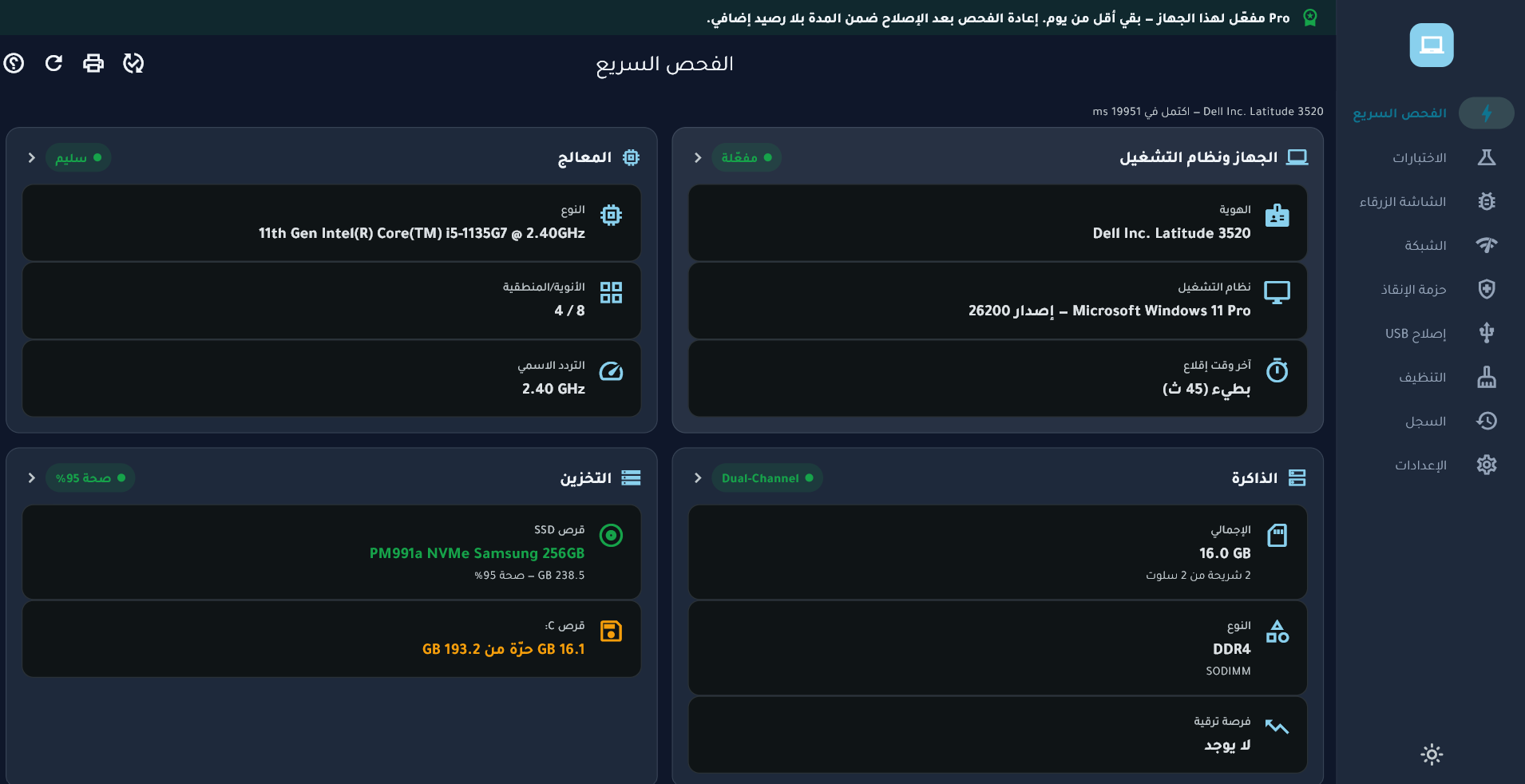
LapDoctor quick scan screen in the Arabic interface: system, operating system, CPU, memory and storage of a Dell Latitude 3520
A real screenshot with the Arabic interface, taken on a Pro-activated computer, which is why the Pro banner shows at the top. The quick scan itself is free, and the app has an English interface too. View full-size image

What LapDoctor does

Every number comes from the machine itself. When there's no reading it can trust, LapDoctor says "Unavailable" and gives the reason instead of showing a guess.

Quick scan with a grade

One scan reads the system, CPU, memory, storage, battery and display, and grades the machine from A+ to F. Run it again after the repair to compare.

  • Battery health: current capacity against factory capacity, and the charge-cycle count.
  • HDD and SSD health as the drive itself reports it: wear, temperature, power-on hours and errors.
  • Memory module by module, plus the number of slots and the maximum capacity the machine accepts.
  • Machine identity: model, serial number and BIOS, Windows edition and activation, TPM and Secure Boot.

Used laptop inspection

  • CPU name spoofing check: compares the name Windows shows with what the processor itself reports.
  • The display panel as it describes itself: maker, model, manufacturing date and size.
  • Replaced parts detection: comparison with a previous visit, plus signs from the machine itself of a part newer or older than the rest. Pro
  • Windows 11 compatibility check, item by item: CPU, TPM 2.0, Secure Boot, memory and graphics driver. Pro

Tests in front of the customer Pro

  • Seven interactive tests: display, keyboard, touchpad and mouse, audio and microphone, camera, ports, and network.
  • CPU stress test for 1, 3 or 5 minutes while watching temperature and clock speed, and a GPU stress test while watching temperature.
  • Memory test, quick or thorough, inside Windows, plus a shortcut to Windows' own boot-time memory check.

Fault diagnosis Pro

  • Blue screen analyzer: crash dumps and the Windows log for the last 30 days, and the part or driver most likely to blame.
  • Network: where the connection breaks (router, internet, DNS, websites), real download speed, and saved Wi-Fi passwords.
  • Drivers: devices with a driver problem as Device Manager sees them, with each problem code explained.

Before and after a format, and maintenance tools

  • Rescue kit before a format: back up Wi-Fi networks and passwords, drivers, bookmarks, the installed-programs list and licence keys.
  • Restore networks and drivers after the new Windows is installed. Pro
  • Repair flash drives and external disks, and test their real capacity to catch fakes. Pro
  • Cleaning with a restore point, moving files to quarantine instead of deleting them for good. Uninstalling programs along with their leftovers. Pro
  • PDF reports in Arabic or English, and a repair certificate comparing before and after, with a QR code. Pro

Items marked Pro need a licence. Everything else is free.

Free and Pro

There's one download for everyone. You start on the free plan, and if you need Pro you enter a licence key in the same installation. No second download.

Free

Never expires. No sign-up.

  • Quick scan and the machine's grade.
  • Detail screens: system, CPU, memory, storage, battery and display.
  • Rescue kit backup before a format.
  • Sizes of the files that can be cleaned.

Pro

Everything in Free, plus:

  • Interactive tests, plus stress and memory tests.
  • Blue screen analyzer, network, drivers and Windows 11 check.
  • Replaced parts detection.
  • USB repair, cleaning, uninstaller, startup programs and a disk space map.
  • Rescue kit restore after a format.
  • Device history, before/after comparison, PDF reports and repair certificates.

Two kinds of Pro licence

Personal: for your own computer

One computer for the whole subscription: 1, 3, 6 or 12 months. It's tied to the computer at first activation. To move it to another computer, contact us.

Shop: for customers' computers

A key with credits. Each credit unlocks Pro on one customer's computer. Re-scanning the same computer within 3 days doesn't use another credit, and a key can activate the same computer at most twice in 30 days.

When a subscription ends, LapDoctor doesn't lock. It goes back to the free plan.

How to get Pro

  1. Message us on WhatsApp to confirm the price and how to pay. In Syria, payment is through ShamCash.
  2. You receive a licence key in the format LD-XXXX-XXXX-XXXX-XXXX.
  3. In LapDoctor, open “Pro & credits” from Settings, enter the key and press “Save & activate”. The computer needs an internet connection at that moment.
Ask about Pro on WhatsApp

Installation and first run

  1. Download LapDoctor-1.0.0.7-setup.exe and run it.
  2. The installer isn't digitally signed yet, so Windows shows a protection message. Click “More info”, then “Run anyway”.
  3. Approve the administrator prompt.
  4. Choose the installer language: Arabic or English. LapDoctor opens in that language the first time.
  5. Open LapDoctor and start a quick scan.

You don't need to turn off your antivirus or any Windows protection. If security software blocks the file, compare its checksum with the one published here and contact us.

Requirements

System
Windows 10 or Windows 11, 64-bit.
Permissions
Installing needs administrator rights. LapDoctor itself runs without them; some tools ask you to run it as administrator and say so before they start.
Internet
Not needed to install or for the free plan. Needed to activate Pro and for the network test.
Other software
None. The required libraries are included in the installer.
Release details and file verification
Version
1.0.0
Release date
File name
LapDoctor-1.0.0.7-setup.exe
Size
17.9 MB (18,758,469 bytes)
SHA-256 checksum
76221dae4990cb9fa304e7f33888dfd29118eda9ff33b9f8e9548415a514067e
Publisher
Vanguard Code. The installer isn't digitally signed.

To verify the file, run this in PowerShell in your downloads folder:

Get-FileHash .\LapDoctor-1.0.0.7-setup.exe -Algorithm SHA256

The result must match the checksum above exactly.

Frequently asked questions

Is the free plan limited in time or number of computers?

No. The quick scan, detail screens and rescue kit backup stay free on every computer, with no sign-up.

Does it work offline?

Yes. You only need the internet to activate Pro and for the network test. A personal key renews by itself whenever the computer is online. If the computer stays offline for more than 7 days, it runs on the free plan until it connects again.

How accurate is the CPU temperature?

On Intel processors, LapDoctor reads the temperature from the processor itself through the optional PawnIO driver, which it installs only after you agree. Without it, it uses the temperature reading the BIOS provides, if there is one. When there's no reading it can rely on, it tells you so instead of showing a number.

Does it fix problems automatically?

No. It measures, diagnoses and shows you where the problem is. Its maintenance tools, such as cleaning, flash drive repair and uninstalling, only run when you start them, and anything that deletes or erases data asks you to confirm first.

Is the interface only in Arabic?

No, the interface is in Arabic and English. It opens in the installer's language or the Windows language, and you can change it in Settings. You choose the language of each PDF report when you print it.

Try LapDoctor on the next laptop in your shop

Direct download, no sign-up and no email. Windows 10 and 11 (64-bit) · 17.9 MB

Download LapDoctor free for Windows

About Vanguard Code and contact

Vanguard Code is a software developer, and LapDoctor is its first product. For questions about the app or a Pro licence, contact us directly.